Why Your Back Hurts After a Long Day at Work
Do you sit in front of a computer for 8 hours a day? By the time you clock out, your lower back feels like cement—does that sound like you?
You open a shopping app and search for “ergonomic chairs.” Prices range from $50 to $3,000. You grit your teeth and buy an expensive one, only to find your back still hurts after a month. So you come to a conclusion: ergonomic chairs are a complete rip-off.
But that conclusion is a bit premature.
The truth is: ergonomic chairs do work, but they only work if you get the right size and adjust them correctly. A chair that doesn’t fit you won’t just fail to protect your back—it can actually make your spine worse off.
In this article, I’m going to break down the buying logic once and for all—from the perspective of spinal curvature. Forget brands, forget aesthetics. We’re only looking at what your body actually needs.
Part One: What Your Spine Goes Through When You Sit
Three Things That Go Wrong When You Sit
To figure out whether an ergonomic chair is a “waste of money,” you first need to understand one thing: what exactly happens to your body when you’re sitting?
First, your spinal discs are “starving.”
The discs in your spine have no direct blood supply. They rely on movement-induced pressure changes to absorb water and nutrients. Loading and unloading the spine helps pump fluid in and out.But when you slouch in a chair, your pelvis tilts backward. Slouching forces your lumbar curve straight.
Worse still, the pressure on your lumbar discs while sitting is 1.4 times higher than when standing. If you’re slouching, that pressure shoots up to 2–3 times higher. (Data source: Wilke et al., 1999, Spine journal—classic in vivo disc pressure measurements.)
Over time, this lack of fluid exchange contributes to disc degeneration.One mechanism involved is glycation. This is a process where excess sugar molecules bind to disc collagen, making the tissue stiffer and more brittle. This is one of the reasons aging and degenerated discs are more prone to tearing and herniation.
Second, your lumbar lordosis is “disappearing.”
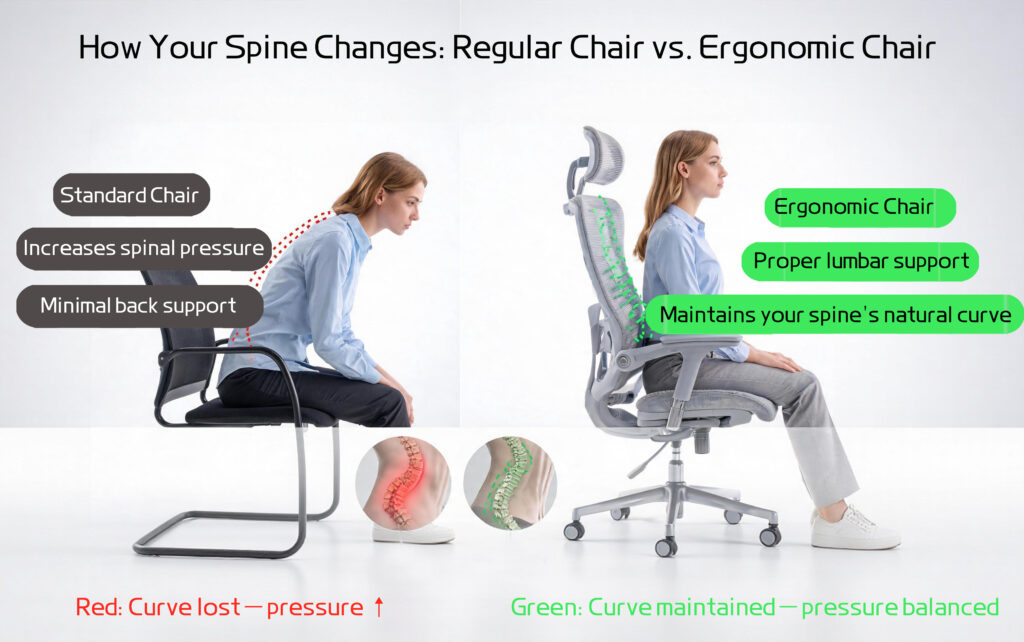
A healthy spine, viewed from the side, forms a natural “S” curve. The lower back has a forward curve—this is called lumbar lordosis. This curve allows the discs to bear weight evenly, distributing your body weight across the entire spine.
But when you slouch in a chair, your pelvis tilts backward. This forces your lumbar curve straight. Your lower back loses support, and all the weight lands on the small joints and ligaments at the back of your spine. And that’s when your lower back starts aching—it’s your body’s alarm bell.
Third, your gluteal muscles are “going offline.”
In a seated position, sitting stretches and inhibits your gluteus maximus. Your brain gradually “forgets” how to activate this muscle—what’s known as “dead butt syndrome.” Your lower back and knees start compensating for the lack of glute engagement, which is why many people experience knee discomfort along with back pain after long hours of sitting.
So as you can see, the harm of prolonged sitting isn’t just “a sore back”—it’s a full-scale breakdown, from your discs to your muscles, from your metabolism to your skeletal structure.
Part Two: What a “Proper” Ergonomic Chair Actually Does
Three Essential Functions of a Good Ergonomic Chair
Now you understand what your spine needs. An ergonomic chair isn’t about making you “more comfortable.” It’s about helping your sitting posture mimic your standing spinal curvature.
A proper ergonomic chair must address three physiological necessities:
1. Maintaining Lumbar Lordosis
The lumbar support on the backrest is the most important part of the chair. Its job is to fill the hollow behind your lower back. This pushes your lumbar spine forward and helps you maintain your natural curve.
Key criterion: The lumbar support must be adjustable in both height and depth. A fixed lumbar support only fits people of a specific height. Set it too low, and it pushes against your sacrum. Set it too high, and it hits your thoracic spine—breaking the spinal alignment either way.
2. Relieving Disc Pressure
The recline function of the backrest isn’t just about “leaning back comfortably.” When you recline, part of your upper body weight transfers to the backrest, significantly reducing the vertical load on your lumbar spine. Regularly changing your sitting angle gives your discs a chance to “pump,” facilitating nutrient exchange.
Key criterion: The recline resistance should be adjustable, and ideally, the backrest should move synchronously with your back (known as “synchronous tilt” technology) to avoid the “shirt-rubbing” friction between your back and the backrest.
3. Keeping Your Pelvis Neutral
The seat depth and seat pan contour determine whether your pelvis stays “square.” If the seat is too shallow, your thighs lack support and all the weight goes to your sit bones. If the seat is too deep, it presses against the back of your knees, forcing you to slide forward with a posterior pelvic tilt—which brings us right back to the “disappearing lumbar lordosis” from Part One.
Key criterion: When seated, your thighs should be fully supported, with a gap of 2–3 finger widths between the back of your knees and the edge of the seat cushion. At the same time, your feet should rest flat on the floor.
Part Three: Why “Expensive” Might Actually Be Wrong for You
Now let’s circle back to the “waste of money” question.
Manufacturers calibrate their frames for adult males around 5’10” to 6’1″ (178–185 cm) and 165–200 lbs (75–90 kg).
If you’re under 5’5″ (165 cm) or over 6’3″ (190 cm), you might be better off with a cheaper Asian-brand chair designed for smaller frames than with one of these premium imports.
Here’s a real example: On one major international brand, the lowest lumbar support setting is still too high for someone 5’5″ tall—it doesn’t support the lumbar spine; it pushes against the sacrum. The sacrum is a solid bone structure that doesn’t need support in the first place, and forcing pressure on it actually tips your pelvis forward. It’s like going to buy a pair of running shoes and being handed a dress shoe two sizes too big—it’s a good shoe, but you’d be better off not wearing it at all.
So the buying principle is simple: don’t “worship” the brand; “trust” the sizing. If possible, visit a physical store and sit in the chair for at least 15 minutes. If you can only buy online, prioritize models with four-way adjustable lumbar support, seat depth, armrests, and headrest—the wider the adjustment range, the more likely it’ll fit your body.
Part Four: The 3-Step Self-Test—Judge Your Current Chair for Free
Before you shell out money for a new chair, run your current chair through these three tests:
Step 1: The Lumbar Gap Test
Sit upright and slide your hand behind your lower back. If the gap between your back and the chair is wider than a fist, this chair’s lumbar support is doing nothing—your lumbar spine is holding on with no support whatsoever.
Step 2: The Thigh Compression Test
Sit all the way back in the seat and check whether the front edge of the cushion is pressing into the underside of your thighs. If the edge digs into the middle of your thighs, the seat depth is too short or the seat angle is off—long-term, this will compress the nerves and blood vessels in your thighs.
Step 3: The Foot Flat Test
Sit naturally with both feet on the floor. If your heels lift off the ground, or if the front edge of the seat presses into the back of your calves, the chair is too tall. Feet dangling in the air means your entire body weight is resting on your sit bones and tailbone—not only does this tire out your lower back, but it also causes tailbone pain.
If any one of these three tests fails, even the most expensive ergonomic chair will still give you back pain when you sit in it. First adjust the seat height so your feet are flat on the floor. Then adjust the seat depth to get the 2–3 finger gap behind your knees. Finally, fine-tune the lumbar support—because changing the seat depth shifts your pelvis position, the lumbar support will need a final tweak. (And don’t forget to check your armrest height last—your elbows should rest at about a 90° angle with your shoulders relaxed.)
If these adjustments still don’t help, then and only then should you consider replacing the chair.
Part Five: Final Thoughts
Let’s return to the original question: Are ergonomic chairs a waste of money?
If your body type matches the chair’s design dimensions, and you’ve properly used all its adjustable features, then it’s not a waste. No, not at all. It’s one of the best investments you can make for your spinal health over the next decade.
But if you ignore sizing, don’t understand how to adjust the chair, and expect a piece of furniture to undo the damage of 10 hours of sitting every day—then yes, it is a waste of money.
No chair, no matter how good, can withstand sitting still for 3 consecutive hours. A chair is just a tool. The real lifesaver is movement. Set an alarm to go off every 45 minutes, stand up, and do 10 backward stretches—this single habit will protect your spinal discs better than any $1,000 chair ever could.
How many of the three self-tests above does your current chair pass? Drop a comment and let me know—I’ll help you figure out whether it’s a chair problem or a posture problem.